
Quick answer: Pinterest’s Verified Merchant Program gives vetted stores a blue checkmark on their profile and pins. You don’t fill in an application anymore: once your business account is at least 3 months old, your website at least 9 months old, your catalog meets Pinterest’s guidelines and your Pinterest tag sends page visit, add to cart and checkout events every week, Pinterest verifies you automatically. When stores don’t get the checkmark, common reasons include the website, the return policy or the tag.
You set up the catalog, you installed the tag, your website looks lovely (if you do say so yourself), and still no blue checkmark. Or worse, you get an email saying your store “does not meet minimum website quality requirements”, with zero explanation of what that actually means. Rude.
The good news is that Pinterest’s rules for this are written down, they’re just spread across three different pages and a forum. So this guide puts them in one place: what the program is, which countries can join, the exact requirements as of October 2026, and the usual reasons stores get turned down, with a fix for each one.
What the Verified Merchant Program Actually Is (And What You Get)
There are two steps here, and Pinterest treats them as different things (Pinterest Help Center). First you become an approved merchant: you claim your website, add your catalog, and Pinterest reviews your shop against its merchant guidelines. Then, once you meet a few more requirements, you become a verified merchant.
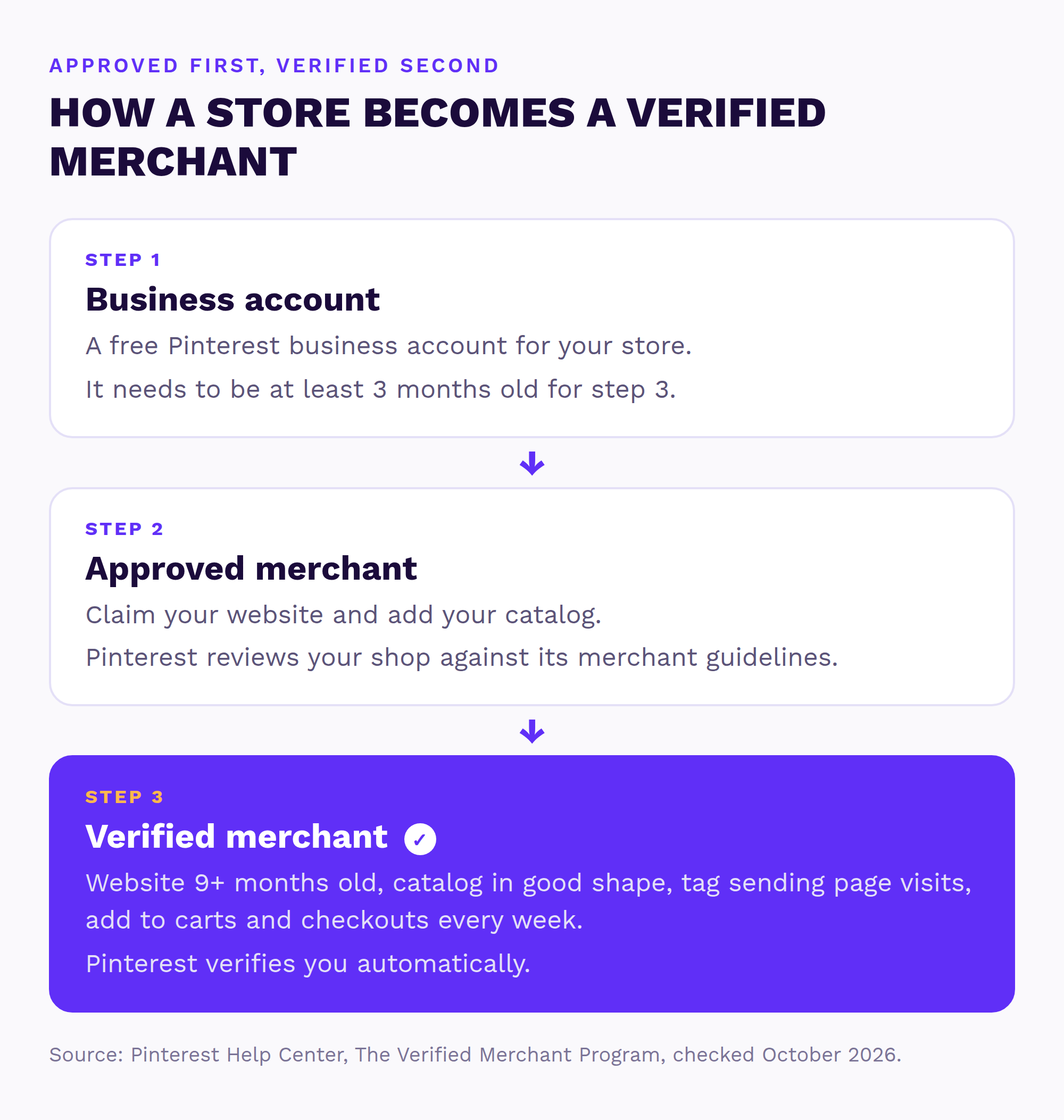
What do you actually get? Pinterest lists two things: a blue checkmark on your profile and pins, so shoppers know you’ve been vetted, and access to exclusive features. There’s one more that matters a lot to stores. Pinterest’s community team has said that price and availability on pins is “now a feature reserved for Verified Merchants” (Pinterest Business Community). It’s not on the program page itself, but if your product pins show no price, this program is often why.
Quick heads-up, because this confuses a lot of people: Pinterest also has “verified accounts” with checkmarks for famous names, and that program is paused (Pinterest Help Center). For a store, the Verified Merchant Program is the only way to get a checkmark right now.

Can Your Store Join? (2026 Country List)
Only stores in certain countries can join. As of October 2026, Pinterest’s availability page lists 35 places:
- Europe: Austria, Belgium, Cyprus, Czechia, Denmark, Finland, France, Germany, Greece, Hungary, Ireland, Italy, Luxembourg, Malta, Netherlands, Norway, Poland, Portugal, Romania, Slovakia, Spain, Sweden, Switzerland, United Kingdom
- The Americas: Argentina, Brazil, Canada, Chile, Colombia, Mexico, United States (plus U.S. Outlying Islands)
- Asia-Pacific: Australia, Japan, New Zealand
If your country isn’t on the list, you can’t join yet, and Pinterest’s advice is to check back. (Older guides list only 13 countries, so if you read that somewhere, it’s out of date.)
Pinterest Verified Merchant Requirements (The Full List)
Here’s what Pinterest’s Verified Merchant Program page asks for. Once you meet all of it, you’re verified automatically, no form to fill in. (Pinterest’s country page still says “apply”, but the program page is the detailed one, and it says verification is automatic.)
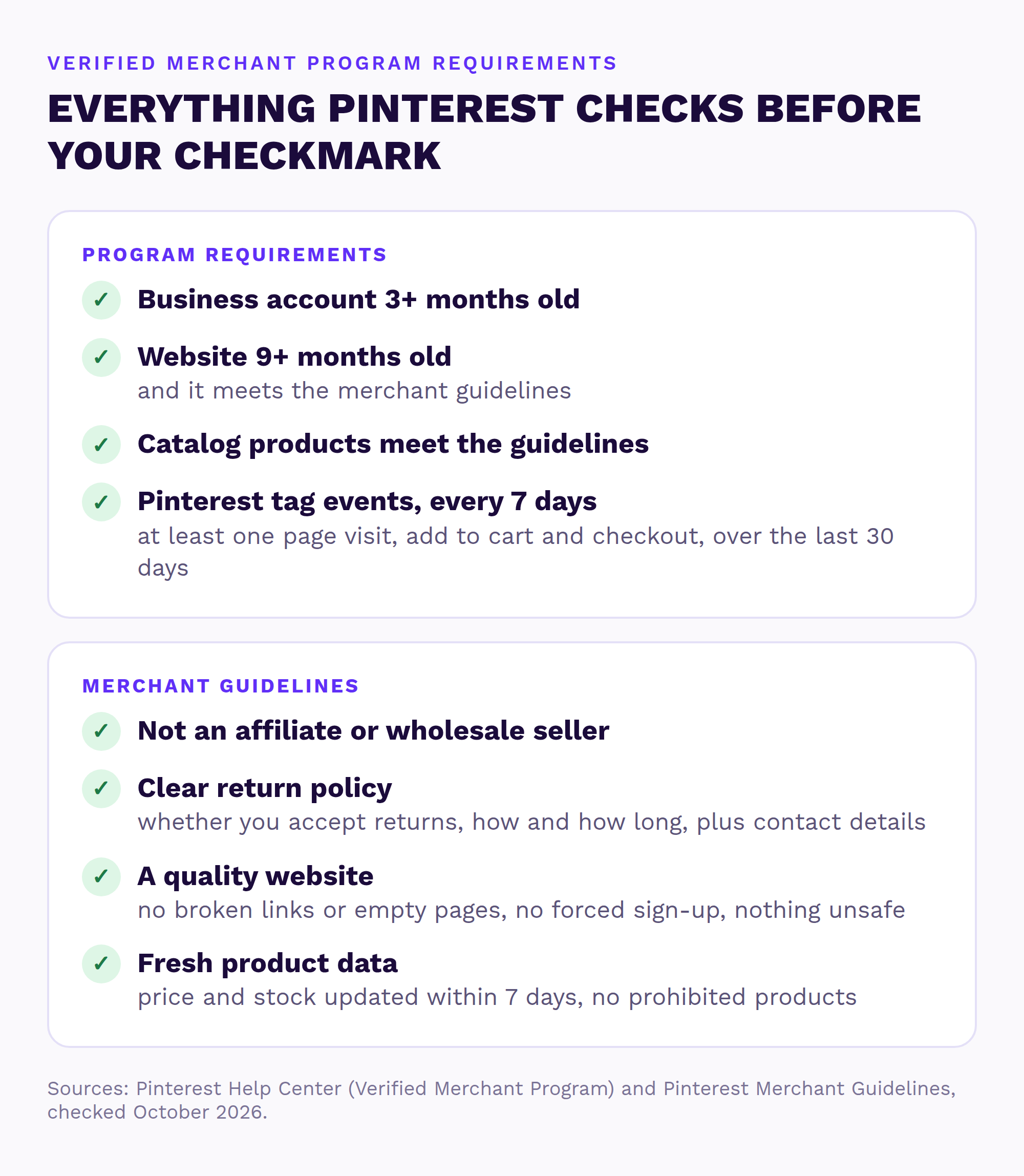
- Your Pinterest business account is at least 3 months old.
- Your website is at least 9 months old and meets the merchant guidelines.
- Your catalog’s products meet the guidelines. If you haven’t got one yet, here’s how to set up your Pinterest catalog.
- Your Pinterest tag is working. In the last 30 days it has sent at least one page visit, one add to cart and one checkout event every 7 days, and a Pinterest moderator adds that checkout events need to include the currency (Pinterest Business Community). My guide to Pinterest analytics shows how to check it.
Then there are the merchant guidelines themselves. In plain English, as of October 2026:
- You’re not an affiliate marketer or a wholesale seller.
- You have an easy-to-find return policy that says whether you take returns, how and how long, with your contact details.
- Your website is good quality: no broken links or half-finished pages, no forcing people to sign up to see products, nothing unsafe or deceptive.
- Pinterest has current price and stock info for your products, from within the last 7 days.
- You don’t sell products Pinterest doesn’t allow as product pins, like alcohol, tobacco, CBD, medicines or pre-owned goods.
Why You Got Rejected (And How to Fix Each One)
Pinterest’s emails are short, so here’s what usually sits behind them and what to do about it.
| What’s wrong | How to fix it |
|---|---|
| “Does not meet minimum website quality” | Pinterest’s guidelines name broken links, incomplete or “coming soon” pages, forcing people to sign up to see products, and anything unsafe or deceptive. Store owners also mention typos, blurry photos and pop-ups, so fix those too. |
| No clear return policy | Add a return policy page that says if you take returns, how, how long, and how to contact you. Link it in your footer. |
| Tag “needs attention” | Your tag isn’t sending the events Pinterest needs. On Shopify, a common cause is the tag being installed twice (once by hand, once by the Pinterest app). |
| Catalog “needs attention” | Fewer than half your products made it into your catalog. Open the catalog, check the errors and fix them. |
| Your store is too new | Business account under 3 months or website under 9 months. Nothing to fix, you just wait. |
| Wrong kind of business or product | Affiliate sites, wholesale shops and products Pinterest doesn’t allow can’t join. |
The tag and catalog warnings come from Pinterest’s own VMP troubleshooting post in its business community, written with the VMP team back in 2020 (Pinterest Business Community), so the screens may look different today. It explains that “Catalog needs attention” means less than 50% of your products were accepted, and it warns Shopify stores to remove any hand-added tag before connecting the Pinterest app.
Store owners in that same community also mention stock photos and copied product descriptions as reasons they were turned down (community tips from 2022). That’s what owners report rather than an official rule, but original photos and your own descriptions never hurt.
One more thing worth knowing: back in 2023, a Pinterest moderator said merchants get 2 attempts to fix guideline violations (Pinterest Business Community). That may have changed since, but it’s a good reason to fix everything properly before you try again, rather than one thing at a time.
Not sure what’s holding you back?
Send me your store and I’ll check your website, catalog and Pinterest tag myself, then send a short report and video with the three fixes I’d make first. Free, within 1 business day, no call needed.
Lost Your Checkmark? What Happens Next
If you stop meeting the requirements, or Pinterest gets lots of user reports about your product pins, you’re suspended from the program (Pinterest Help Center). Here’s how it works:
- Pinterest alerts you, including by email.
- You get 30 days to fix the problem. Fix it in time and you’re added back automatically.
- Miss the 30 days and you lose your verified merchant status.
- Losing the checkmark doesn’t always mean losing approved merchant status, so your catalog and ads can keep running.
- Changes can take up to 48 hours to show up.
If it’s your whole Pinterest account that’s switched off rather than just the checkmark, that’s a different problem, and my guide on what to do when your Pinterest account is suspended covers it.
Verified Merchant Program FAQ
How do I get verified on Pinterest?
For a store, the way to get a checkmark is the Verified Merchant Program. Once your business account is 3+ months old, your website 9+ months old, your catalog meets Pinterest’s guidelines and your Pinterest tag sends page visit, add to cart and checkout events every week, Pinterest verifies you automatically. Pinterest’s separate verification for famous names is paused.
How long does it take to become a verified merchant?
At least as long as the age requirements: your business account needs to be 3 months old and your website 9 months old. After you meet everything, Pinterest says changes can take up to 48 hours to show.
Is the Verified Merchant Program available in my country?
As of October 2026 it’s available in 35 places, including the US, UK, Canada, Australia, New Zealand, Japan and most of the EU, Finland included. Pinterest’s availability page has the current list.
Do I need a Shopify store to become a verified merchant?
No. You need a claimed website, a catalog and a working Pinterest tag. The Pinterest app for Shopify just makes the catalog and tag easier to set up.
Why did I lose my verified merchant status?
Usually because one of the requirements slipped, like your tag stopped sending checkout events or your catalog has errors, or because of user reports on your product pins. You get 30 days to fix it and you’re added back automatically.
Can someone get my store ready for the Verified Merchant Program?
Yes. Send me your store and I’ll check your website, catalog and Pinterest tag myself. Within 1 business day, you get a free Shelf Check: a short report and video with the three fixes I’d make first.
Want your store VMP-ready?
I’ll look at your website, catalog and tag myself and send a short report and video with the three fixes I’d make first. Free, within 1 business day, no call needed. If you’d rather hand it over, my Setup Sprint gets your catalog, tag and boards ready for the program.
Sources (checked October 2026)
- Pinterest Help Center: The Verified Merchant Program
- Pinterest Help Center: Verified Merchant Program availability
- Pinterest: Merchant guidelines
- Pinterest Business Community: VMP technical best practices and troubleshooting tips (2020)
- Pinterest Business Community: Catalog rejected for website quality (2023)
- Pinterest Business Community: Verified Merchant Program tips (2022)
- Pinterest Help Center: Verified accounts
- Pinterest Business Community: Product Pins aren’t showing the price