
Quick answer: Pinterest keyword research means finding the exact words shoppers type into Pinterest to find products like yours. Start free. Type your product into Pinterest search, note the related-search bubbles, and check Pinterest Trends. Then sort your keywords by product, category and occasion. Use them in pin titles, descriptions, board names and product titles.
A linen duvet cover can be searched as “linen bedding”, “washed linen duvet”, “neutral bedroom” or “green linen bedding”. Each one is a different shopper looking for the same product. Keyword research shows you which words they use. Then your pins can show up for all of them.
All of the methods below are free, and they take about an hour for a small catalog.

What is Pinterest keyword research?
Pinterest keyword research is collecting the words people search on Pinterest and matching them to your products. A Pinterest keyword is a word or phrase someone types into the search bar, like “travertine coffee table” or “housewarming gift ideas”.
It matters because Pinterest works like a search engine. Pinterest’s own SEO guide tells creators to put keywords in their titles, descriptions, image names and alt text. And since 96% of top Pinterest searches are unbranded, the right product words matter more than your brand name.
Step 1: Start with the Pinterest search bar
The Pinterest search bar is the fastest free keyword tool, because it suggests real searches as you type. Type your product in slowly. Before you press enter, Pinterest suggests ways to finish the search. Those suggestions come from what people search. Write them down.
Try a few starting words for each product. Use the product name (“linen duvet cover”), the material (“linen bedding”) and the room (“neutral bedroom”). This is the simplest keyword search there is, and it’s free.
Step 2: Use the related-search bubbles
Related-search bubbles are the colored chips Pinterest shows under the search bar after you press enter. Each one is a related search, so each one is a keyword idea.

Click a bubble and Pinterest adds it to your search. You get a longer keyword and a new row of bubbles. For a store, color and material bubbles like “green” or “washed” often match variants you already sell.
Step 3: Check interest in Pinterest Trends
Pinterest Trends shows you, for free, when a keyword peaks and which keywords are biggest. It tracks interest over time, for up to two years. Each chart runs from 0 to 100, so it shows when a keyword peaks, not exact search counts. The Pinterest Trends help page explains how the index works.
My favorite trick is the “Top yearly trends” tab with the “Include keyword” filter. Type a broad word like “coffee table”. Pinterest lists the top keywords that contain it, each with a volume bar.
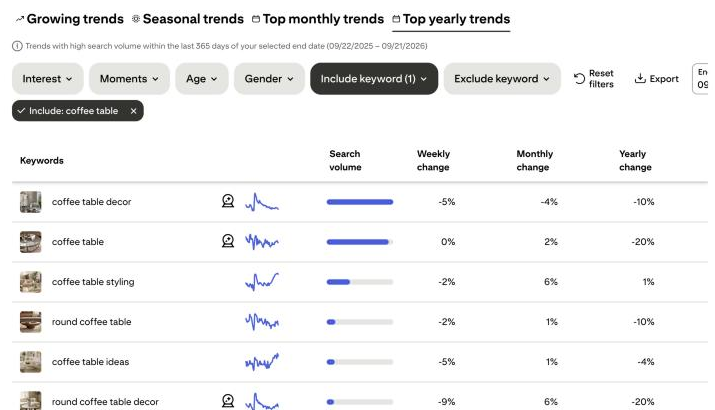
This is the closest thing to a free Pinterest keyword tool with volume. It won’t give exact numbers. But it shows which keywords are bigger and which are growing.
Do your boards and pins match what shoppers actually search?
I’ll look at your store and Pinterest myself and send a short report and video with the three fixes I’d make first. Free, within 1 business day, no call needed.
Step 4: Build one keyword list for your catalog
A keyword list is one spreadsheet that matches every keyword to a type and a page on your store. For each keyword, note the type and the page it should link to. I use four types, which I explain in Pinterest SEO for ecommerce.
| Keyword | Type | Link it to |
|---|---|---|
| coffee table decor | Category | Coffee tables collection |
| round travertine coffee table | Product | That product page |
| housewarming gift ideas | Occasion | Gift guide or gift collection |
| how to style a coffee table | Problem | Styling guide on your blog |
Group the list by product or collection. Each group becomes a board. Each keyword goes into pin titles and descriptions. My guide to Pinterest boards for business shows how to name them.
How to check Pinterest keyword search volume
Pinterest doesn’t publish exact monthly searches for every keyword. Here’s what you can use instead:
| Source | What it shows | Cost |
|---|---|---|
| Pinterest search bar and bubbles | What people search, no numbers | Free |
| Pinterest Trends | Relative interest over time (0 to 100), top keywords with volume bars | Free |
| Pinterest Ads Manager keywords | Estimated monthly searches for keywords you add to an ad group. You can look without launching an ad | Free to look (business account) |
| Tailwind keyword research | Pinterest search volume when available, plus a comparison score | Free plan |
| Keysearch or other Google keyword tools | Google search volume and difficulty | Paid |
The Ads Manager trick: start a campaign draft, add keywords in the targeting step, and note the monthly searches it shows. Then close the draft without publishing it.
I use Pinterest’s own tools first. Then I check Keysearch to see which keywords also get Google searches. My rule of thumb: when a keyword is strong in both places, it earns a product pin and a spot in your product title.
Where to put your Pinterest keywords
Once you have the list, the keywords go in six places on and around each pin. Good pin design for ecommerce matters too, but keywords are what get the pin found.

A real pin from my own queue
Here’s a pin from my fashion blog’s Tailwind queue (September 2026). The main keyword, “curvy casual outfit ideas”, leads the title and the alt text. The description works in a related search, “curvy casual outfits”, and the link goes to the exact post, not the homepage.
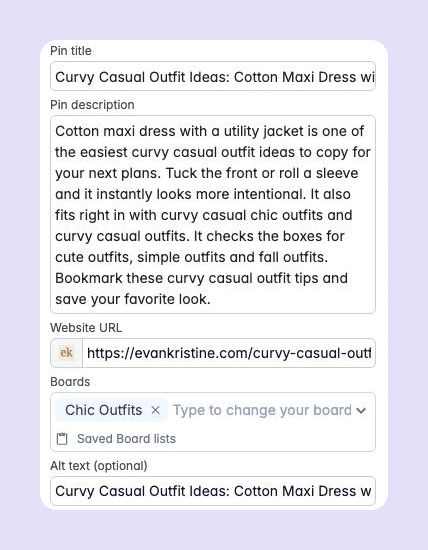
For a store, I’d change two things. I’d trim the last two sentences, which list more keywords than a shopper needs. And I’d save it to a board named after a real search, like “Curvy Casual Outfits”, instead of “Chic Outfits”.
Pinterest title and description examples
Here’s how that looks for two products. The keyword comes first in the title. The description reads like a normal sentence.
| Pin title | Pin description |
|---|---|
| Travertine Coffee Table for a Modern Living Room | A round travertine coffee table with a honed finish. Pairs well with a neutral living room and a wool rug. Free shipping in the US. |
| Washed Linen Duvet Cover in Sage Green | A soft, washed linen duvet cover for a calm, neutral bedroom. Available in queen and king sizes. |
Catalog pins use your store’s product titles, so fix those too. You edit them under Products in Shopify, WooCommerce and BigCommerce, and in the product editor in Squarespace. Put the keyword first: “Round Travertine Coffee Table” beats “TRV-036”. The new titles reach Pinterest the next time your catalog syncs.
Common Pinterest keyword research mistakes
Most keyword mistakes come from doing research once, then stuffing the words in everywhere. These are the ones I see most:
- Researching once and never again. Check Pinterest Trends each season.
- Using the same keyword on every pin. Spread related keywords across different pins.
- Stuffing a list of keywords into the description instead of writing a sentence.
- Ignoring occasion keywords like “wedding registry” or “Mother’s Day gift”.
- Leaving product titles as codes. Then your Pinterest catalog pins have no keywords at all.
Key takeaways
- Pinterest keyword research finds the exact words shoppers type into Pinterest.
- Start free: search bar suggestions, related-search bubbles, then Pinterest Trends.
- Use the Trends “Include keyword” filter to see the biggest keywords for a product.
- Sort keywords by product, category, occasion and problem, and link each to the right page.
- Put keywords in pin titles, descriptions, alt text, board names and catalog product titles.
Keywords are one part of the bigger plan in my Pinterest marketing playbook for ecommerce. For seasonal keywords, see the Pinterest marketing calendar.
Frequently asked questions
How do I do Pinterest keyword research for free?
Type your product into the Pinterest search bar and note the suggestions, then use the related-search bubbles under the results. Finish with Pinterest Trends to see when interest peaks and which keywords are biggest.
Is there a free Pinterest keyword tool?
Yes. Pinterest Trends is free and shows interest over time plus top keywords with volume bars. Tailwind also has a free Pinterest keyword research tool that shows search volume when it’s available.
How do I see Pinterest keyword search volume?
Pinterest doesn’t show exact monthly searches for every keyword. Pinterest Trends shows relative interest from 0 to 100 and volume bars for top keywords. Pinterest Ads Manager shows estimated monthly searches when you add keywords to an ad draft, and some third-party tools estimate volume too.
How many keywords should I use per pin?
Use one main keyword in the title and one or two related terms in the description. Write it as a normal sentence rather than a list of keywords.
Where do Pinterest keywords go?
In the pin title, pin description, image alt text, board name and description, your profile, and the product titles in your catalog.
Can someone check my store’s Pinterest keywords for me?
Yes. Send me your store and I’ll check your Pinterest myself. Within 1 business day, you get a free Shelf Check: a short report and video with the three fixes I’d make first.
Sources