
That little “AI modified” tag means Pinterest thinks your image was made or edited with AI, because the owner marked it as AI, because the file itself says so in its hidden data, or because Pinterest’s own detection guessed it. Real product photos can get it after one AI edit, or by plain mistake, since Pinterest admits its systems aren’t perfect. If the label is wrong, you can appeal it through Pinterest’s “Appeal a Gen AI label” form.
The people behind a pizza page shared their own original photos, edited only to add text and resize them in Canva, and Pinterest stamped “AI modified” on the pins anyway. They asked the Pinterest Business Community what to do, and the thread still doesn’t have a happy ending (as of October 2026, nobody in it reports a successful appeal).
If your store sells anything people look at closely before they pay, like linen, ceramics, jewelry or food, that tag on your product photo is not a small thing. This guide explains what the AI modified label on Pinterest means, why real photos get it, whether it can cost you shoppers, and how to appeal it and stop it from happening again.
(New to Pinterest for your store? My guide to Pinterest marketing for ecommerce is the place to start.)
Your label, your next step: a 20-second check
- Did you use an AI eraser, AI background or “enhance” button on the photo? Read the section on why real photos get labeled first.
- No AI anywhere, just crop, color and text? Jump straight to the appeal steps.
- Is it most of your product pins, not one or two? That’s a workflow problem, so read the prevention section too.
- Did you make the image with AI on purpose? Then the label is correct, and the last section is for you.
What Does ‘AI Modified’ Mean on Pinterest? (The Short, Honest Version)
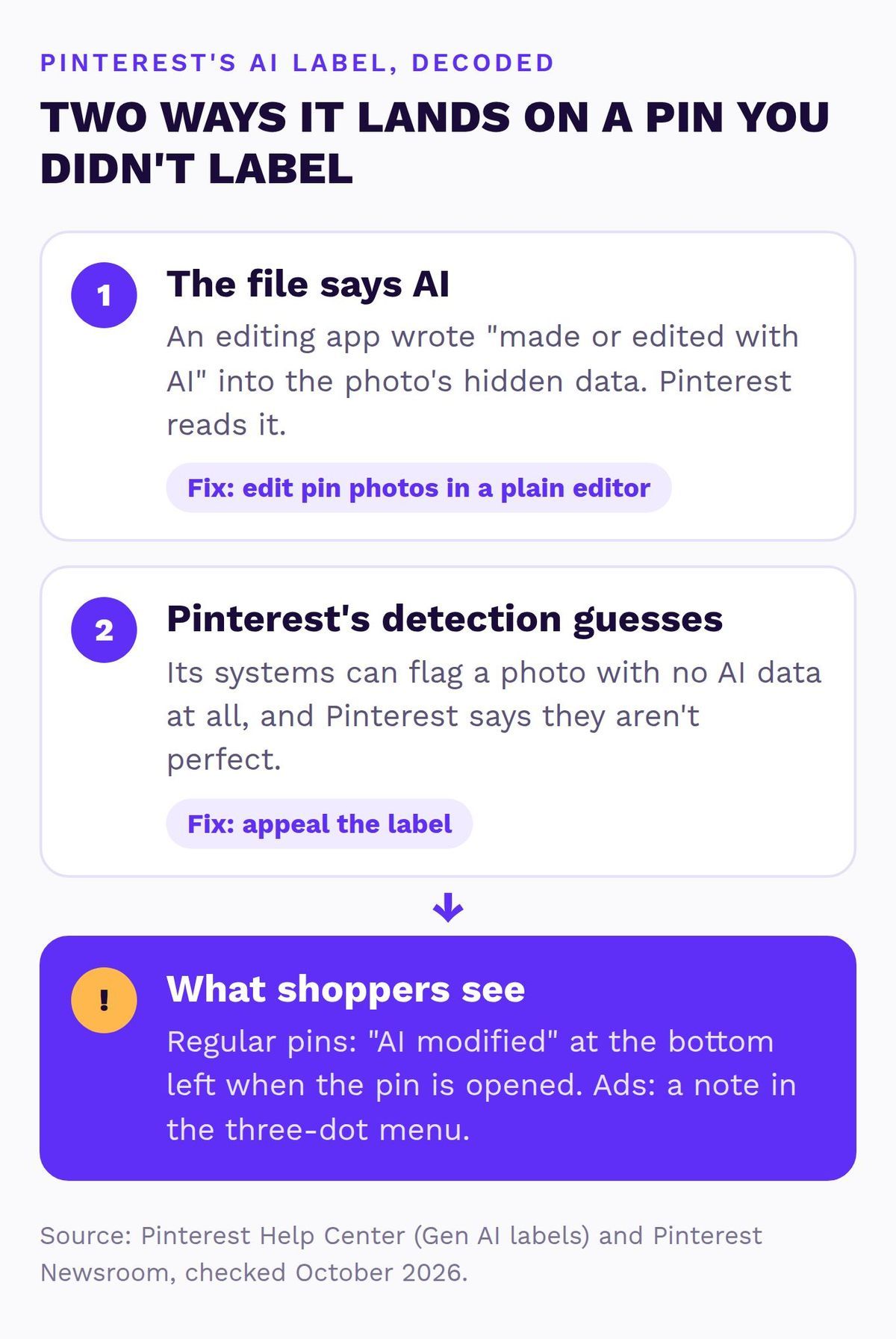
“AI modified” is Pinterest’s label for images it believes were generated or edited with generative AI. On a regular pin, it shows at the bottom left once someone opens the pin. On ads, it’s tucked into the three-dot menu instead, as a note saying the ad was modified with AI, according to Pinterest’s Help Center article on Gen AI labels.
A pin gets the label in one of three ways. The owner can switch on “Mark as AI-Modified” when creating the pin. Pinterest also reads the image’s metadata (the hidden data saved inside a photo file, following a standard called IPTC), and it runs its own classifiers, which can flag an image even when the file carries no AI marker at all.
The first one never happens by accident. The other two can. Pinterest rolled the label out globally in April 2025 and said in its announcement that these systems “aren’t perfect”, which is a polite way of saying your perfectly real throw pillow can get caught.

One thing worth knowing before you panic: Pinterest doesn’t ban AI images. It labels them, and the label doesn’t take your pin down.
Why Are My Real Product Photos Labeled AI Modified?
Most of the time, the camera isn’t the problem. One AI button somewhere in the editing chain is. Some phones and editing apps now write a “made or edited with AI” note into the file when you use their AI tools.
Google uses that kind of IPTC note for photos edited with Magic Eraser on Pixel phones (IPTC), and Adobe says its Firefly-powered features in Photoshop, like Generative Fill, automatically attach Content Credentials, its own record of AI use (Adobe).
Pinterest only says it reads IPTC metadata, so whether it reads Adobe’s record directly isn’t public. The other cause is Pinterest’s detection simply guessing wrong, which is what the pizza page and plenty of artists in the community forums describe.
Here’s how the usual edits stack up, as far as anyone can confirm today:
| The edit | What happens, and what to do |
|---|---|
| AI eraser on your phone | Can add an AI note (confirmed on Google Pixel). Use plain crop and light tools instead. |
| Generative Fill or Expand | Adobe adds Content Credentials (whether Pinterest reads them isn’t public). Keep an unedited version for pins. |
| AI background removal | Unknown, it depends on the app. Test one pin first. |
| Crop, light, color, text | Shouldn’t add an AI note, but can still get labeled. Appeal it. |
| Fully AI-made image | Labeled, and rightly so. Don’t use it as the product photo. |
Catalog images count too. If your Pinterest catalog pulls product photos that went through an AI tool on your store’s side, those can get labeled as well, so check where your catalog images come from before you blame Pinterest.
Does the AI Modified Label Hurt Your Reach or Sales?
Honest answer: Pinterest hasn’t said the label lowers how often your pins are shown, so I’m not going to tell you it does. Anyone who gives you a percentage is guessing.
What Pinterest has said is this. Since October 2025, people can choose to see fewer AI images in certain categories, from their settings (“refine your recommendations”) or from a pin’s three-dot menu. The categories are home decor, women’s, men’s and children’s fashion, beauty, art, architecture, entertainment, health and sport, plus food and drink since December 2025 (Pinterest Newsroom). If you sell in those categories, that’s most of your shoppers’ world.
So my read, and it’s a read, not a Pinterest statement: a product photo that’s wrongly labeled as AI may reach fewer of the people who switched that setting on. Then there’s the trust part. Someone deciding whether a $90 duvet cover is really that soft sees a tag suggesting the photo isn’t quite real, and that’s not the moment you want them wondering if your store is legit.
Not sure which of your pins are labeled?
I’ll go through your Pinterest and store myself, product photos included, and send a short report and video with the three fixes I’d make first. Free, within 1 business day, no call needed.
How to Remove the AI Modified Label: Appeal It in 5 Steps
You can’t switch the label off yourself. Pinterest support has to review it, and the official route is an appeal. This is the order I’d do it in:
- Find every labeled pin. Open your best-selling products’ pins one by one and look at the bottom left corner. Make a list of the links.
- Work out why. Check which apps touched each photo. If you used an AI eraser or Generative Fill, the label is technically right, so fix the photo and repin instead of appealing.
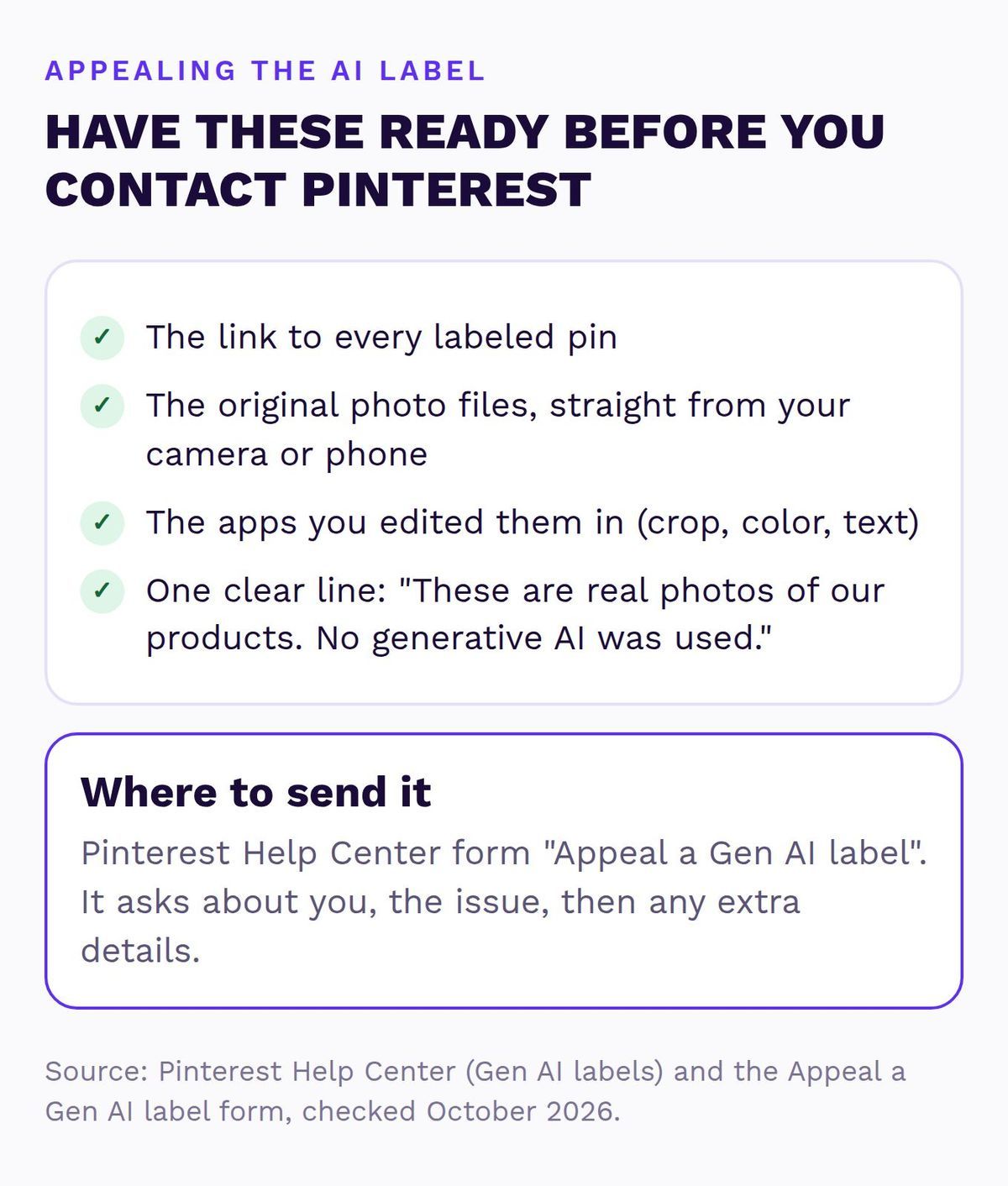
- Open the Appeal a Gen AI label form in Pinterest’s Help Center. It asks for your name, username and email, then a description of the issue. (Pinterest’s Gen AI labels article also says to contact support to appeal.)
- Describe it plainly. Paste the pin links and write one clear line, like “These are real photos of our own products, edited only for crop, color and text. No generative AI was used.”
- Keep the originals. Hold on to the untouched files from your camera or phone in case support asks, and keep a note of the date you appealed.
A fair warning, because I’d want one: nobody in the Pinterest forums posts how long appeals take, and at least one person says re-uploading the same image got it labeled again. It’s one form, then you wait for Pinterest’s reply by email, the same patience game as appealing a suspended Pinterest account.
How to Keep New Product Pins From Getting Labeled
Appealing pins one by one gets old fast, so fix the workflow behind them. Keep two folders: “pin photos”, edited only with crop, light, color and text, and “playground”, where the AI tools live. Before you make 20 new pins from a fresh photo shoot, publish one and check it after a day or two.
If a test pin gets labeled even with plain edits, appeal that one before you make the rest, so you’re not stuck appealing twenty. None of this changes what makes a pin click, so the rest of my advice on Pinterest pin design for stores still applies.
And keep the original files. Your camera roll is your proof.
Should Stores Use AI Product Photos on Pinterest at All?
Here’s where I stand. AI is fine for mood, mock-ups and showing an idea, as long as nobody’s pretending otherwise. When I post an AI image on Pinterest, I switch on Mark as AI-Modified myself when I upload it, and if Pinterest slaps the label on first, I leave it alone.
I don’t appeal those, because the label is right, and I’d rather be the account that’s upfront about it than the one arguing with Pinterest over a photo I made with AI.
Your product photo is different. It’s the thing a shopper uses to decide what lands on their doorstep, and your product pins pull that photo straight from your store. If the duvet in the photo looks softer or brighter than the real one, you don’t just get a label, you get returns and “not as pictured” reviews, which cost a lot more than a slightly less dreamy photo.
If one editing habit has put the label on half your catalog, that’s a setup job, the kind I sort out in a Setup Sprint along with your catalog and tag. If you’d rather never think about it again, my Simmer plan makes fresh pins from your real product photos every month. And if it’s three pins and a free evening, you honestly don’t need me. Appeal them and carry on.
Key Takeaways
- “AI modified” means Pinterest thinks the image was made or edited with AI, from the owner’s own toggle, the file’s metadata or its own detection.
- AI erasers and Generative Fill can leave an AI note in the file. Crop, color and text on their own shouldn’t, but mistakes happen.
- Pinterest hasn’t said the label cuts reach, but shoppers can now choose to see fewer AI images in home decor, fashion, beauty, food and more.
- Wrongly labeled? Use Pinterest’s Appeal a Gen AI label form, keep your originals, and test new pins before a big batch.
Quick Questions About Pinterest’s AI Label
What does AI modified mean on Pinterest?
It means Pinterest believes the image was generated or edited with AI. It comes from the owner marking it as AI, the image’s metadata or Pinterest’s own detection, and the label shows at the bottom left when someone opens the pin.
Can shoppers turn off AI pins on Pinterest?
Not completely, but they can choose to see fewer AI images in categories like home decor, fashion, beauty and food and drink. They do it under refine your recommendations in their settings or from a pin’s three-dot menu.
Do Pinterest ads get an AI label too?
Yes. On ads, the AI note sits in the three-dot menu instead of on the image, and it can come from what the advertiser disclosed or from Pinterest’s detection. My guide to Pinterest ads for ecommerce covers the rest of the ad setup.
Will re-uploading the photo remove the AI modified label?
Not reliably. Pinterest’s detection can label the same image again, and at least one person in the Pinterest forums reports exactly that, so appeal the label and fix the editing step that caused it instead.
The AI modified label on Pinterest is annoying, but it’s fixable, and most of the time it’s one editing button away from never happening again. Keep your product photos real, keep the originals somewhere safe, and save the AI fun for the mood board.
Worried your product photos look fake on Pinterest?
I’ll check your pins and the store pages behind them myself and send a short report and video with the three fixes I’d make first. Free, within 1 business day, no call needed.
Sources (checked October 2026)
- Pinterest Help Center: Gen AI labels
- Pinterest Newsroom: Introducing Gen AI labels (April 2025)
- Pinterest Newsroom: More control over GenAI content (October 2025, updated December 2025)
- Pinterest Help Center: Appeal a Gen AI label form
- IPTC: Google AI transparency based on IPTC standards (October 2024)
- Adobe: Photoshop Generative Fill and Content Credentials (April 2024)
- Pinterest Business Community: Original food photos labelled as AI modified